

In this tutorial I will show you how to create a subdomain in cPanel. This is useful if for example you are going to create another website under another website's domain.
A subdomain requires a domain name. So if your domain is 'rootsandshootstz.org', a subdomain of that domain could be 'africa.rootsandshootstz.org'.
Create a subdomain in cPanel
- Log into your cPanel.
- Click on the 'Subdomains' icon.

- Enter your subdomain in the 'Subdomain:' field.
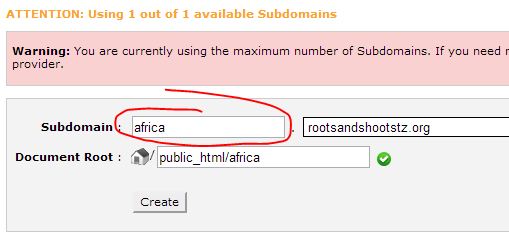
- Click the 'Create' button.